On Windows#
Prerequisites#
Clone the GCBM Belize repository
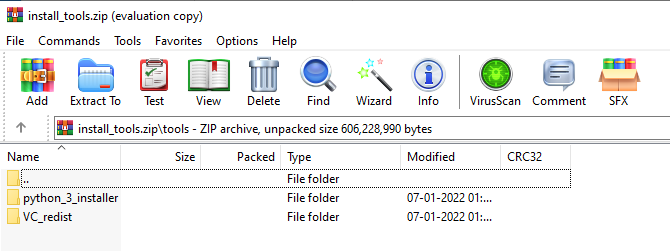
2. Download the installation tools from releases: install_tools, and unzip them into Standalone_GCBMtools folder. On unzipping, Standalone_GCBMtools will contain a folder tools with the folders python_3_installer and VC_redist . The configuration is strictly for Python3.7, it will not work with other versions
Running the simulation (short version)#
Navigate to Standalone_GCBM`, edit `run_all.bat and set the GCBM_PYTHON path and PLATFORM` variables in the USER CONFIGURATION section near the top to the correct values for your system
Run run_all.bat, which performs the following preprocessing, and simulation
Running the project (long version)#
This involves running each stage of the simulation step by step. There are 12 steps in all. It helps in understanding the sequence of steps, inputs, outputs and dependencies to each step
Step 1#
Working directory : Standalone_GCBM\layers\tiled
c:\\python37\\python.exe ..\\..\\tools\\Tiler\\tiler.py
- Description :
- define all spatial layers needed for the simulation - can be raster or shapefile:
bounding box
age
classifiers
disturbance events (optional)
crops all layers to a bounding box and reprojects to WGS84 processes layers into GCBM tile/block/cell format
Output is a number of zip files containing GCBM-format data plus a json file containing metadata and an optional attribute table
Output : Logs written into Standalone_GCBM\logs\tiler_log.txt
Step 2#
Working directory : Standalone_GCBM
tools\\Recliner2GCBM-x64\\Recliner2GCBM.exe -c input_database\\recliner2gcbm_config.json
Description :
Runs the command-line version of Recliner2GCBM (toolsRecliner2GCBM-[x86x64]Recliner2GCBM.exe) on the saved project configuration made by running the GUI tool (Recliner2GCBM-GUI.exe)
Note: The paths in the saved recliner2gcbm_config.json file are relative to the location of the json file
Output : An SQLite database gcbm_input.db which contains all of the non-spatial data required to run the project parameters taken from a CBM3 ArchiveIndex database - disturbance matrices, default climate data, etc.
Step 3#
Working directory : Standalone_GCBM
c:\\python37\\python.exe input_database\\add_species_vol_to_bio.py input_database\\gcbm_input.db
Description : Adding a generic tropical species and Vol to Bio parameters
Step 4#
Working directory : Standalone_GCBM
c:\\python37\\python.exe input_database\\modify_root_parameters.py input_database\\gcbm_input.db
Description : Modify root parameters
Step 5#
Working directory : Standalone_GCBM
c:\\python37\\python.exe input_database\\modify_decay_parameters.py input_database\\gcbm_input.db
Description : Modify decay parameters
Step 6#
Working directory : Standalone_GCBM
c:\\python37\\python.exe input_database\\modify_turnover_parameters.py input_database\\gcbm_input.db
Description : Modify turnover parameters
Step 7#
Working directory : Standalone_GCBM
c:\\python37\\python.exe input_database\\modify_spinup_parameters.py input_database\\gcbm_input.db
Description : Modify spinup parameters
Step 8#
Working directory : Standalone_GCBM\gcbm_project
update_gcbm_configuration.bat
Description :
Update the GCBM configuration
- Automatically updates the GCBM configuration files based on the tiled layers:
scans for all of the tiled layers and adds them to the provider configuration file
sets the tile, block, and cell size in the config files so that the model knows the overall resolution of the simulation (the lowest common denominator of all the tiled layer resolutions)
updates the list of disturbance layers in the simulation based on the DisturbanceLayer items in tiler.py
updates the initial classifier set with the classifier layers tagged in tiler.py
Output : Logs generated in Standalone_GCBM\logs\update_gcbm_config.log
Step 9#
Working directory : Standalone_GCBM\gcbm_project
run_gcbm.bat
Description :
Run the GCBM model
Project configuration is split between multiple files listed in gcbm_project\gcbm_config.cfg
Data source configuration (spatial layers + SQLite) is in gcbm_project\provider_config.json
Output : Logs generated in Standalone_GCBM\logs\Moja_Debug.log
Step 10#
Working directory : Standalone_GCBM\tools\CompileGCBMSpatialOutput
create_tiffs.bat
Description :
Compile the spatial output
Generates tiff layers from raw GCBM spatial output
Output :
A tiff layer per indicator and timestep in processed_output\spatial
Logs written into Standalone_GCBM\logs\create_tiffs.log
Step 11#
Working directory : Standalone_GCBM\tools\CompileGCBMResults
compileGCBMResults.bat
Description :
Compile the GCBM results
Turns the raw GCBM output database into a more user-friendly format containing most of the familiar indicators from the CBM3 Toolbox
Produces processed_output\compiled_gcbm_output.db